
Author: Grace Xu
Electronic data, has become an indispensable part of our life and work: recording a child’s first toddler steps, casually snapping a picture of a beautiful scene in the snow, documenting an unusual trip, all of these are precious memories of our lives, and we need a solution that allows us to upload and save the big data files in a timely way; business documents at work, contracts, and customer information, etc., also need to be safely and properly preserved.
电子数据,已经成为我们生活和工作中不可或缺的组成部分:记录孩子的第一次蹒跚学步,随手拍下的雪中美景,记录一次不同寻常的旅行,这些都是我们生活的珍贵回忆,我们需要一个能够及时上传和保存大数据文件的方案;工作中的商业文件、合同和客户资料等,同样需要安全妥善地保存。
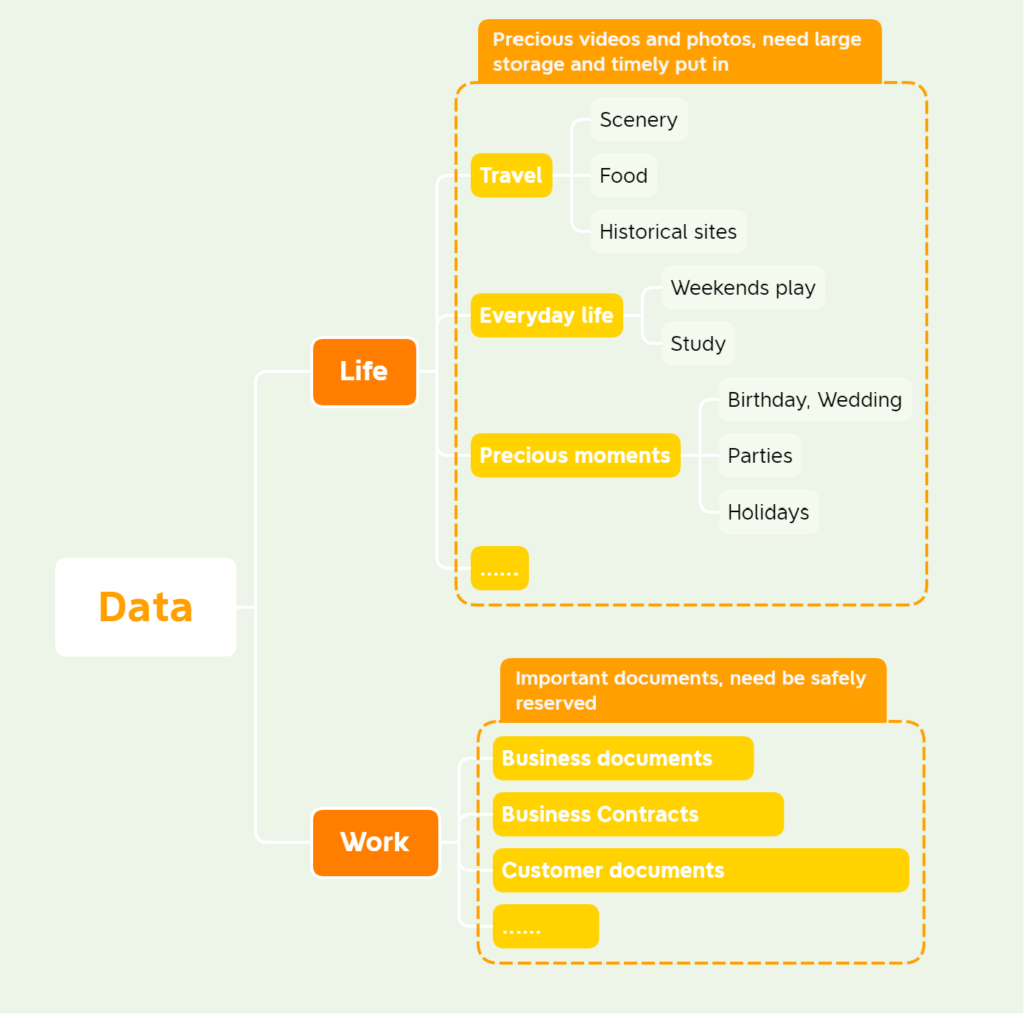
We will introduce three solutions and integrate the advantages, disadvantages and data value ratings of each solution to give a proposal for a safe, convenient and cost-effective method of storing electronic data.
我们将为大家介绍三种解决方案,并整合各种方案的优缺点和数据价值等级,给出一个安全、便利、经济实用的电子数据存储方法建议。
1. Three methods of storing electronic data 电子数据的三种储存方法
1.1 Entry Level: Portable Hard Drives 入门级:移动硬盘
This is the more common storage method. There are two main categories of portable hard drives: mechanical hard drives and solid state drives.
这是比较常见的储存方法。移动硬盘主要分两类:机械硬盘和固态硬盘。
The advantage of using a mechanical hard disk as a portable hard disk is that it is inexpensive, but it is very afraid of vibration. However, vibration is inevitable during use, so this kind of portable hard disk is very easy to be damaged. I’ve broken a few portable hard disks, all because of vibration.
使用机械硬盘作为移动硬盘,优点是价格低廉,但是非常怕震动。然而在使用过程中不可避免的会产生震动,因此这种移动硬盘非常容易损坏。我就曾经用坏过几块移动硬盘,都是因为震动造成的。
Using a solid state drive as a portable hard disk is more expensive although it avoids damage to the hard disk due to vibration.
使用固态硬盘作为移动硬盘虽然避免了因震动造成硬盘的损坏,但是价格较高。
Overall, the disadvantages of using a portable hard drive are the lack of convenience and the risk of carrying the drive around with you.
总体来看,使用移动硬盘的缺点是不够方便,随身携带硬盘的风险也比较大。
1.2 Intermediate: Web storage中级:网盘存储
More recommended are Microsoft OneDrive, Dropbox, Google Drive, etc. The advantage of this method is that it is easy to use, you can go to the cloud at any time for data uploading, downloading and backup, and multiple computers can be synchronized with one account.
比较推荐的有微软的OneDrive,Dropbox,Google Drive等,这种方法的优点是使用方便,可以随时到云端进行数据上传、下载和备份,一个账号多台电脑可以同步。
There are still limitations to this approach, one is the risk of data leakage if the data exists in the cloud, and the other is the longer synchronization time for larger files (mainly videos).
这种方式还是有局限性,一是数据存在云端有数据泄露的风险,二是较大的文件(主要是视频)同步时间较长。
1.3 Advanced: NAS Storage 进阶:NAS存储
The full name of NAS is Network Attached Storage, which can be understood as a computer that is only responsible for storage.
NAS 的全称是 Network Attached Storage,即网络附加存储,可以理解为一台只负责存储的电脑。
The biggest feature of NAS as a storage server is that you can access the storage space over the network and perform many functions, such as data synchronization, photo backup, and backup of important information.
NAS 作为一台存储服务器,最大的特点是可以通过网络访问存储空间并实现很多功能,如数据同步,照片备份,重要资料备份等。
The most important function of NAS is that it can maximize data security, generally if the data of multiple hard disks in the NAS is not damaged at the same time, the data can be recovered in a timely manner.
NAS最重要的功能就是可以最大程度上保证数据的安全,一般只要不是NAS中的多块硬盘数据同时损坏,都可以及时将数据恢复。
When there is a NAS in the home, any device, if it can connect to the NAS and is given access permissions, this device can access the data stored in the NAS. We can access the data in NAS on our cell phones, laptops, iPads, and smart TVs, which is very convenient.
当家庭中有了NAS后,任何设备,只要它能连上 NAS 并且被赋予了访问权限,这台设备就可以访问 NAS 中存储的数据。我们可以在手机、笔记本、iPad、智能电视上访问 NAS 中的数据,非常方便。
2. Recommended electronic data storage solutions推荐的电子数据存储方案
When choosing a data storage solution, it is recommended to first categorize the data:
在选择数据存储方案时,建议先将数据进行分类:
Class 1 data: core owned data, your own photos, forms, videos, etc. that are unique and cannot be accessed from anywhere else. This type of data is the focus of backup.
一类数据:核心自有数据,自己的照片,表格,视频等,具有唯一性,无法从其他地方获取的。这类数据是备份的重点。
Class 2 data: more difficult to obtain but can be obtained again, such as one’s own collection of books music, etc., lost can be re-downloaded, but need to re-organize, more time-consuming.
二类数据:较难获取但是可以再次得到的,比如自己收集的书籍音乐等,丢失了可以重新下载,但需要重新整理,比较费时。
Class 3 data: common easily accessible resources and data, mainly including downloaded software, movies and other relatively large files, do not need to backup multiple times, just re-download when needed.
三类数据:普通容易获得的资源和数据,主要包括下载的软件、电影等比较大的文件,不需要多次备份,需要的时候重新下载就好了。
The principle of backup is to keep multiple identical backups of important data in different locations. Each copy replaces the other.
备份的原则就是重要的数据要在不同地点保存多个相同的备份。每一份都能相互取代。
Suggested home storage solutions are:
建议的家庭存储方案是:
Class 1 data are backed up in PC, Web Storage, and NAS, and the highest level of backup scheme is set in NAS. This ensures the security of the data and makes it easier to use.
Class 2 data is backed up in both PC and NAS, and the general level of backup program is set in NAS.
Class 3 data is only stored in the NAS, and set the lowest level of backup scheme to ensure easy access.
一类数据在个人电脑,网盘,NAS中均做备份,并且在NAS中设置最高等级的备份方案。既保证了数据的安全性,平时使用也比较方便。
二类数据在个人电脑和NAS中均作备份,并且在NAS中设置一般等级的备份方案。
三类数据仅在NAS中存储,并设置最低等级的备份方案,保证访问方便即可。
The cost of the above program is not low, but for the value of the data, this cost is really nothing. For the above scenarios, the initial investment cost is $1000-$2000 (mainly for NAS), and the later cost is around $100 per year (mainly for the Web Storage membership fee).
上述方案的成本是不低,但是对于数据的价值来说,这点成本真不算什么。以上方案,初始投资成本在$1000-$2000(主要是NAS),后期每年成本$100左右(主要是网盘会员费)。
The rapid development of technology can never replace and change what we really cherish, and that is the precious memories and beautiful moments in life, which deserve to be cherished and savored forever.
How to effectively utilize the developing technology to serve our good life and work is a topic we will always explore.
科技的飞速发展永远无法取代和改变我们真正珍视的东西,那就是珍贵的回忆和生活中的美好时刻,值得我们永久珍藏和回味。
如何有效利用不断发展的科技手段,为我们的美好生活和工作服务,是我们将一直探讨的话题。